A full on-screen voicemail UI rendered directly on Cisco SPA 3xx/5xx and Cisco 88xx MPP handsets. Browse mailboxes by extension, scroll through messages, play / pause / skip / delete from the keypad, move between folders, record and replace greetings — all from the phone's own XML service engine, with no app, no cloud, and no per-device licenses.
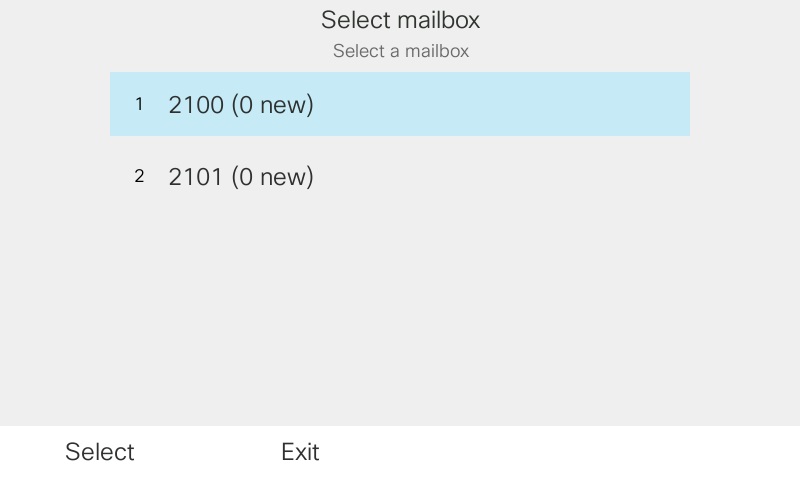
Phones with several line-keys open into a mailbox picker that lists each extension and its new-message count. A phone with a single configured mailbox skips the picker and lands straight in that mailbox's INBOX.
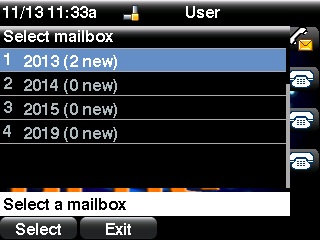
First screen on a multi-mailbox phone — each line-key extension with its live new-message count. Same server, same URL template family, two firmware families.
Paste onto an Extended Function softkey. SPA firmware expands $UIDn to the extension on line-key n, so one template fits every SPA phone in the fleet.
Set as the phone's Services URL. 88xx MPP does not expand $UIDn, so extension numbers are listed per phone; empty slots stay in the URL to satisfy the strict parameter-order check.
The phone's built-in XML service engine does the rendering. FreePBX does the voicemail. The module is the bridge.
Admin pastes one strict-order URL into the phone's Cisco XML services (or an Extended Function key on the SPA line). The URL carries the phone's extension line-keys plus its identity macros: ?user1=$UID1&user2=$UID2&...&userN=$UIDN&model=$PN&mac=$MA&serial=$SN. SPA phones use eight slots (one per line-key); 88xx MPP phones use ten.
The first request from a given handset is Trust-On-First-Use: the server records the phone's MAC, serial, model, and source IP against the primary extension in a customvvm_bindings row. Every subsequent request must match all three identity fields AND arrive from an IP that's live in that extension's PJSIP contact list. A stolen tarball of the Services URL on another phone will not authenticate.
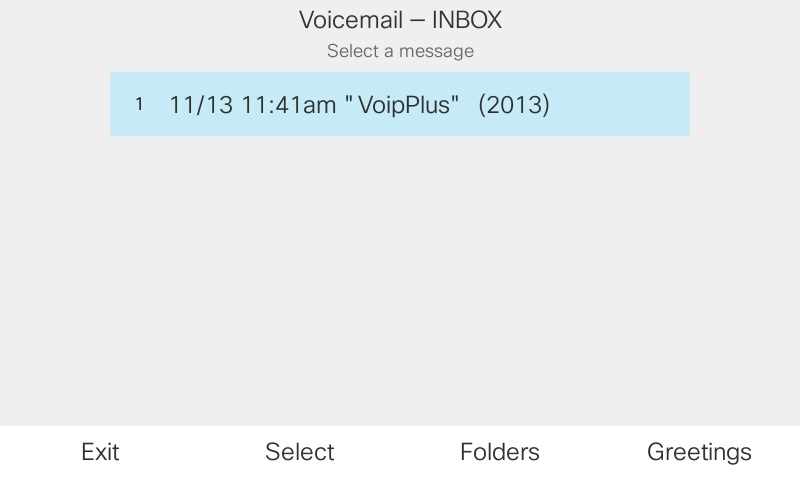
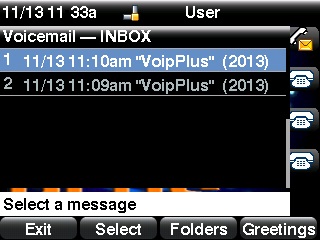
From the picker (or straight into INBOX on a single-mailbox phone) the user sees every folder, every message's caller ID + duration + timestamp. Play, pause, skip 10s, rewind 10s, delete, move between folders — all from the phone's softkeys and the four-key keypad shortcuts. Folders include the four structural ones (INBOX, Old, Deleted, Urgent) plus Family / Friends / Work / Cust1-5 out of the box.
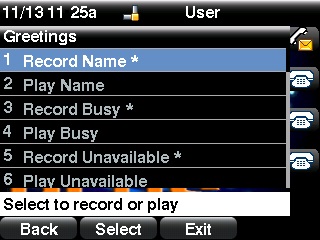
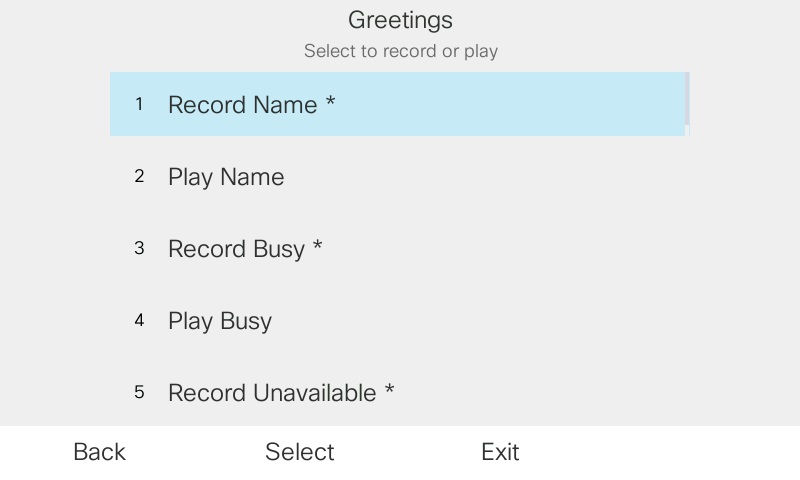
From the Greetings screen the user records Name, Busy, Unavailable, and a Temporary greeting directly, listens back, and replaces them — the module spins up a one-shot auto-answer intercom call to its own dialplan context, captures the audio with Asterisk's Record(), and files it into the mailbox's standard voicemail folder. No separate app, no file upload, no USB cable.
First Play of a new message moves it from INBOX to Old server-side; when the user exits the app, one voicemail reload fires so every subscribed endpoint picks up the new count. The message-waiting light tracks what's unread, not what's been deleted.
After the first strict-order request the server mints a session token bound to the source IP. Every subsequent softkey press carries only ?token= instead of the full identity block — smaller URLs, no identity in logs beyond the first request. TTL slides on every call, so an active user never drops mid-session.
Every folder reads the same way. Newest first, caller ID + duration + timestamp per row.
INBOX list — same layout for Old, Deleted, Urgent, and every custom folder. Softkeys scroll and select; up/down navigation keys move the highlight.
The playback leg is a one-shot auto-answer intercom call. The keypad controls ControlPlayback, so you get seek without softkeys on every handset.
4 — rewind 10 seconds5 — pause / resume6 — skip 10 seconds0 — stop and return to the message listAny Cisco handset whose firmware speaks the CiscoIPPhone XML schema works. These are the two families we build against and test on real hardware.
Full-color validated on SPA 525G2 fw 7.6.2f, SPA504G, SPA514G, and SPA303. The Services URL goes on an Extended Function key using the stock fnc=xml;url=… syntax. Line-key macros $UID1…$UID8 expand automatically on the SPA firmware, so one URL template fits every SPA phone in the fleet. SPA runs HTTP; the strict-order URL and TOFU binding carry the identity.
Cisco 88xx handsets running the Multiplatform Phone firmware. Services URL supports modern TLS, so the handset talks to FreePBX over https:// and every softkey + Refresh URL the server emits stays same-origin. The 88xx firmware does not expand $UIDn macros, so the admin lists the extensions by number per phone (up to ten slots). $PN / $MA / $SN for model/MAC/serial work the same way on both firmware families, so the TOFU binding flow is identical.
Record and replace Name / Busy / Unavailable / Temporary greetings directly on the phone. No mailbox PIN dance, no admin UI round-trip.
Greetings menu — current state (recorded or default) shown inline per kind. Select one to play back, or press Record to replace it.
Install as a standard FreePBX module. The module writes a self-contained [customvvm-intercom] dialplan block into extensions_custom.conf on every reload — no manual conf edits.
Go to Admin → Module Admin → Upload modules and upload the tarball. Or use Download (From Web) to pull it from the VoIP Stuff repo.
Find "Custom Visual Voicemail" in the module list, click Install, then Apply Config. The dialplan block lands in extensions_custom.conf automatically. Every extension page now carries a VVM tab showing its current handset binding; the Admin → Visual Voicemail page shows every binding and the provisioning URL template for both SPA and 88xx.
After installation, navigate to Admin → Visual Voicemail for the provisioning URL to paste into each phone and the live bindings table. The Extensions → VVM tab on an individual extension shows its current binding and a Clear Binding button for when hardware is swapped.
Uninstall removes the dialplan block, the DB tables, and the menu entry — voicemail itself (app_voicemail) is untouched.
Alongside. The underlying voicemail store is Asterisk's own (app_voicemail + the standard /var/spool/asterisk/voicemail/default/<ext>/ layout). The module reads and writes those files directly, so *97, email-attached voicemail, UCP voicemail, and third-party voicemail apps all keep working against the same mailboxes. Deleting a message on the handset makes it disappear from *97 too; the two views are always consistent.
Three layers. First, the request URL must arrive in strict parameter order — reordered or shortened URLs are refused before any identity check. Second, the (MAC, Serial, Model) triplet must match the Trust-On-First-Use binding recorded on the first request, and every follow-up request's REMOTE_ADDR must appear in the live PJSIP contact list for one of the extensions the phone authorized to. Third, session tokens are bound to the IP that minted them. Replaying a captured URL from a different device or a different IP does not authenticate.
Admin opens the primary extension's VVM tab and clicks Clear Binding. The next request from the new handset rebinds. One extension — one phone — one binding. No per-swap provisioning edit.
Yes. SPA firmware 7.x is comfortable on HTTP and existing SPA fleets stay on HTTP unchanged. 88xx MPP speaks modern TLS, so we recommend HTTPS for 88xx phones — the module reads the request scheme at the entry point and emits every softkey / Refresh / Execute URL back on the same scheme the phone opened, so same-origin URL policy on MPP is satisfied without any admin configuration.
No. Standard fwconsole ma install only — no root prompts, no system-level packages, no Asterisk restart. Everything runs inside the FreePBX module framework.
Not in this module — transcription is a separate concern. If you want that, pair it with our FreePBX Voicemail Transcription module (Whisper-powered, same mailbox store, no coupling).
Yes. Released under the MIT license — free for commercial and personal use. No license keys, no subscriptions, no phone-home.
Give your Cisco handsets a real voicemail UI. Install the module, paste one URL into each phone, and your users stop dialing *97.