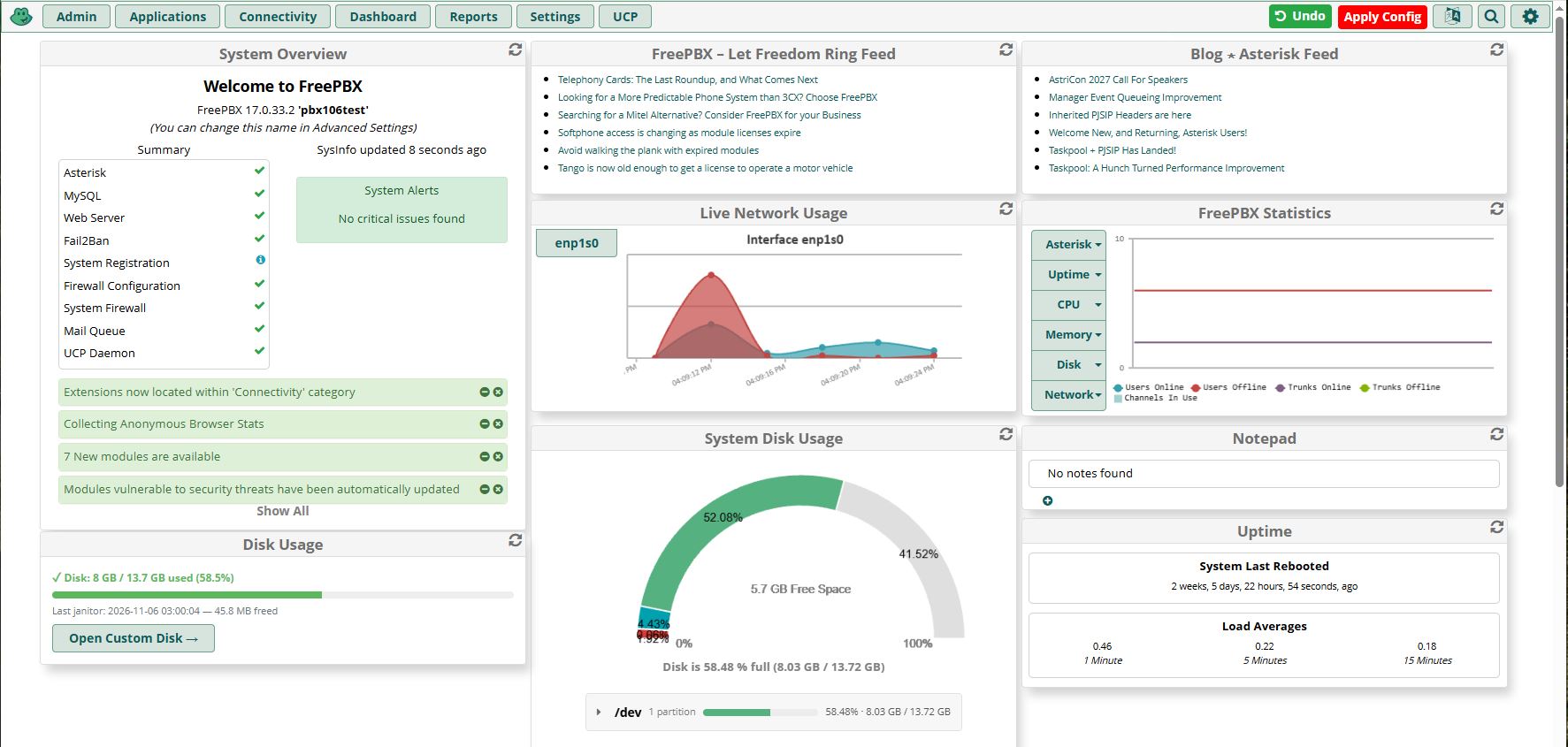
Add a green Undo button next to the red Apply Config bar. One click reverts every change made since your last Apply — admin UI edits you haven't Applied, UCP user tweaks, even direct database changes — back to the state the PBX was in the last time you clicked Apply Config.
The green Undo button appears the moment FreePBX has a pending Apply — same trigger as the red bar. It hides itself once the state is clean.
Per-table shadow snapshots inside MySQL. No mysqldump, no on-disk DB artifact, no secrets on disk.
At the end of every successful Apply Config, the module walks the asterisk database and, for each UI-mutable table T, refreshes a sibling customundo_shadow_<T> table. The shadow IS the snapshot — byte-for-byte parity with the live table at the moment Apply ran.
Edit an extension, flip a route, adjust voicemail. FreePBX sets its need_reload flag and the red Apply Config bar appears. Our module polls the same flag, computes a per-table CHECKSUM TABLE compare against each shadow, and shows the green Undo button next to Apply Config.
A modal confirms the action, showing the age of the snapshot. Confirm, and the modal switches to a spinner that cannot be dismissed while the restore runs. For every table whose live checksum differs from its shadow, the module does DROP TABLE live; CREATE TABLE live LIKE shadow; INSERT INTO live SELECT * FROM shadow; — and only for those tables. Tables whose checksum matches aren't touched at all.
The module runs fwconsole reload to regenerate the Asterisk configs from the restored database, clears the need_reload flag, re-syncs the shadows with the post-reload state, and reloads your browser page via a fresh GET so the form you were on shows the reverted values. Both the Undo and Apply Config bars disappear — nothing to Apply, nothing to Undo.
The snapshot records every installed module's version. If any module has been upgraded or downgraded between snapshot and Undo, the restore is hard-refused — a shadow captured against an older schema would corrupt the live database if written back after an ALTER TABLE.
Undo reverts changes from any source — the admin UI, UCP, REST API endpoints that didn't themselves Apply, direct mysql edits, cron jobs that tweak the DB. If the operation ended with an Apply Config, it created its own snapshot and is already safe.
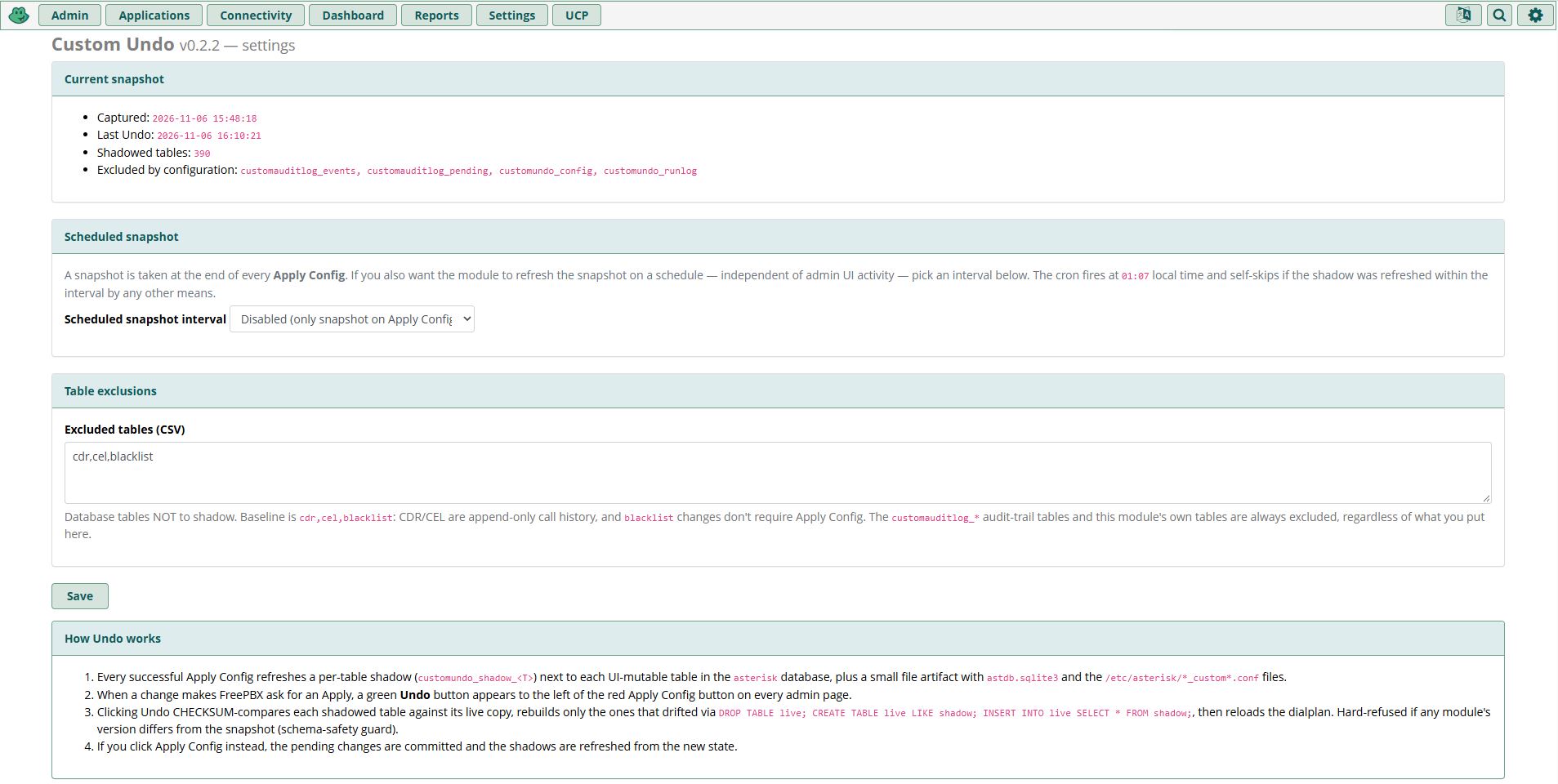
Two knobs. Everything else is already correct.
Disabled by default — the Apply-time snapshot is usually enough. If your PBX goes long stretches without Admin UI activity (and you want a baseline refreshed even so) pick Daily, Weekly, or Monthly. The cron fires at 01:07 local time and self-skips if the shadow was refreshed within the interval by any other channel.
Tables NOT to shadow. The baseline is cdr,cel,blacklist — CDR/CEL are append-only call history, and FreePBX's blacklist changes don't require Apply Config. Audit-log tables and the module's own tables are always excluded regardless of what you put here. Add any other table you don't want rolled back by an Undo.
The checksum pre-check means unchanged tables cost zero writes. Row-level deltas mean a one-row change writes one row, not a whole table.
For every shadowed table: CHECKSUM TABLE live vs CHECKSUM TABLE shadow. Match → skip, no writes. Mismatch + same schema + single-column PK → PK-aware row-level delta (insert missing, delete extras, replace only rows that differ). Schema drifted → full rebuild. Composite PK → DELETE FROM shadow; INSERT INTO shadow SELECT * FROM live; (keeps the tablespace file intact, no DROP+CREATE churn).
Same three-way branch, mirrored. On a typical PBX with ~400 shadowed tables, a snapshot after a one-row extension edit writes a handful of rows, not thousands. An Undo that reverts one admin change runs in about a second of database work plus the fwconsole reload at the end.
Install as a standard FreePBX module. No root, no system packages, no stop/start of Asterisk.
Go to Admin → Module Admin → Upload modules and upload the tarball. Or use the Download (From Web) option to pull it directly from the repo.
Find "Custom Undo" in the module list, click Install, then Apply Config. The first Apply after install captures the initial shadow set — the Undo button appears on the next change you make.
After installation, navigate to Admin → Undo to see the current snapshot's details, optionally enable a scheduled snapshot cron, and tune the excluded-tables list.
Uninstall drops the cron entry (if any), the shadow tables, the runlog, and the config — no manual cleanup needed.
Every configuration change made since the last Apply Config, in every UI-mutable database table the module shadows. This includes pending admin UI edits you haven't yet Applied, UCP user changes (which typically don't trigger a reload), and direct mysql edits. Call history (CDR/CEL) and the audit-log tables are never reverted.
If the REST or CLI operation ended with its own Apply Config (most well-behaved endpoints do), it created its own snapshot and the previous state is already overwritten — Undo would only revert as far back as that operation's snapshot. If it didn't trigger an Apply, it falls into the standard Undo scope and will be reverted.
The DB swap takes about one second even on a large install. The subsequent fwconsole reload is the same reload Apply Config would run — dialplan regenerated, PJSIP endpoints re-read, no Asterisk stop/start. Active calls are not dropped.
The restore is hard-refused. The snapshot records every installed module's version; any mismatch blocks the restore and the modal shows which modules differ. A shadow captured against an older schema would corrupt the DB if written back after an ALTER TABLE.
No — one snapshot only, overwritten by every Apply Config. The mental model is git-like: Apply is a commit, Undo is a revert to the last commit. If you want multiple restore points, each Apply Config is one.
Roughly the size of the UI-mutable tables in the asterisk database — a few megabytes on a typical PBX, more on large installs with many extensions. Call history and recordings are excluded by default, so the shadow does not scale with call volume.
Yes. Released under the MIT license — free for commercial and personal use. No license keys, no subscriptions, no phone-home.
One-click revert of your last FreePBX changes. Install the module and the Undo button will be there the next time you save an extension.