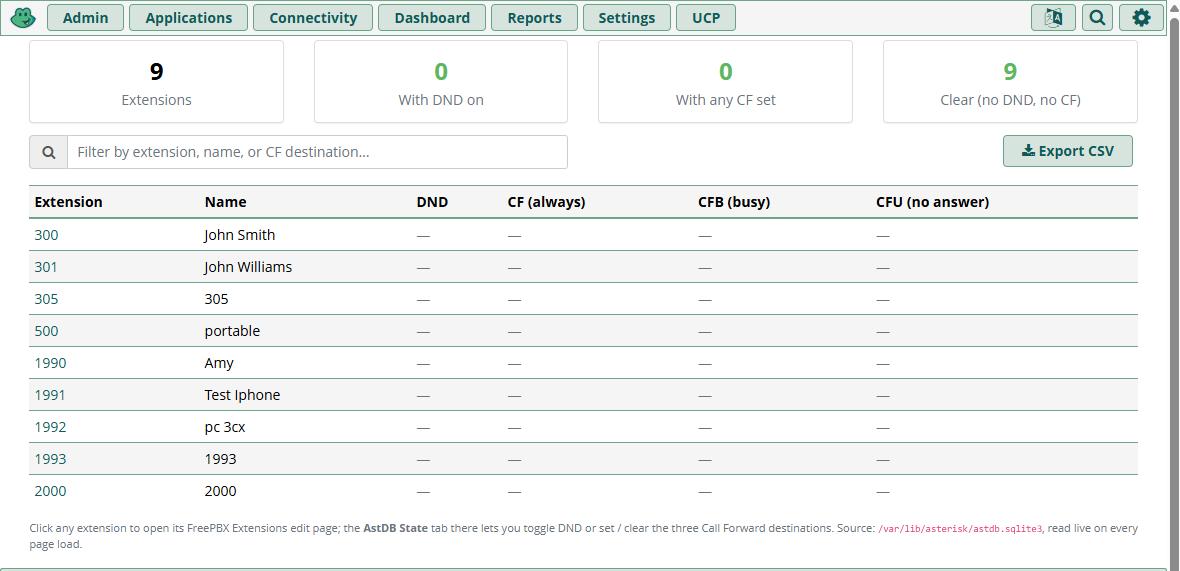
Admin → AstDB Status — every extension on the PBX in one table, with color-coded badges (red for DND on, amber for CF set, muted dash for clear)
See and clear stuck DND and Call Forward on any extension without asking the user. A free, open-source FreePBX 16/17 module that surfaces every extension's Do Not Disturb, Call Forward (always), Call Forward on Busy, and Call Forward on No Answer state — the four flags stock FreePBX has no admin UI for — and lets an admin toggle or clear them with one click. Plus a UCP widget so end users can self-manage.
When a user complains "calls aren't reaching my extension," the first thing every FreePBX admin should check is whether DND or Call Forward is set on that extension. The astdb keys (/DND/1001, /CF/1001, /CFB/1001, /CFU/1001) drive Asterisk's call-routing decisions on every inbound call — and the user can flip them on at any time by dialing a feature code (*78 DND on, *72 set CF, etc.) from their handset.
Here's the problem: stock FreePBX has no admin surface for these four flags. You can confirm by clicking through every tab on any Extensions edit page — there's no DND status, no Call Forward indicator, no clear button. Custom AstDB fills that exact gap in three places at once.
* code — assumes they remember they turned it on, assumes they have phone access, assumes they don't argueasterisk -rx 'database del DND <ext>' — requires root and command-line familiaritydonotdisturb UCP widget — but UCP is end-user-facing; not all admins log in there, and it only handles DND (not CF)There's nothing admins can use from the standard Extensions edit page. Until now.
Compatibility: FreePBX 16 and 17. Depends on the stock donotdisturb and callforward core modules (already shipped with every FreePBX install). No new database tables — all state lives in Asterisk's astdb where it always has.
Three surfaces over one shared data layer. Every write routes through the same core helpers, so BLF stays correct on every connected device.
A table of every extension on the PBX with current DND/CF/CFB/CFU state, color-coded badges, filter box, CSV export. Each extension number is a deep-link to its AstDB State tab.
A new AstDB State tab on every extension's edit page. DND on/off radio, three CF destination fields with inline Clear buttons. All four save in one transaction.
A per-extension self-service widget in User Control Panel. Ownership-gated server-side — users can only see and edit their own assigned extensions.
Every write routes through the core helpers:
Setting DND from our admin tab fires the exact same per-device AST_FUNC_DEVICE_STATE updates that dialing *78 from the handset would. BLF lights on physical phones stay accurate. The module never uses raw database_put calls — we deliberately reuse the helpers that already encapsulate the BLF side-effects.
Admin → AstDB Status shows every extension on the PBX in one table.
| Extension | Name | DND | CF (always) | CFB (busy) | CFU (no answer) |
|---|---|---|---|---|---|
| 1001 | John Smith | ON | — | — | — |
| 1002 | Mary Jones | — | 5551234 | — | 5551234 |
| 1003 | Front Desk | — | — | — | — |
A summary panel above the table shows totals at a glance — "1 with DND, 3 with CF set, 5 clear" — so you can see fleet state in one second.
Filter box does live client-side filtering on extension number, user name, or CF destination — useful on PBXes with hundreds of extensions. CSV export generates an auditable snapshot for compliance reviews. Each extension number is a deep-link directly to that extension's AstDB State tab.
Performance: the status page reads all four families (/DND/*, /CF/*, /CFB/*, /CFU/*) in a single direct-sqlite scan of /var/lib/asterisk/astdb.sqlite3. No AMI round-trips for the bulk read; renders in milliseconds even on a 500-extension fleet.
Open any extension's edit page (Admin → Extensions → 1001 → Edit). A new AstDB State tab appears alongside General, Voicemail, Find Me/Follow Me, etc.
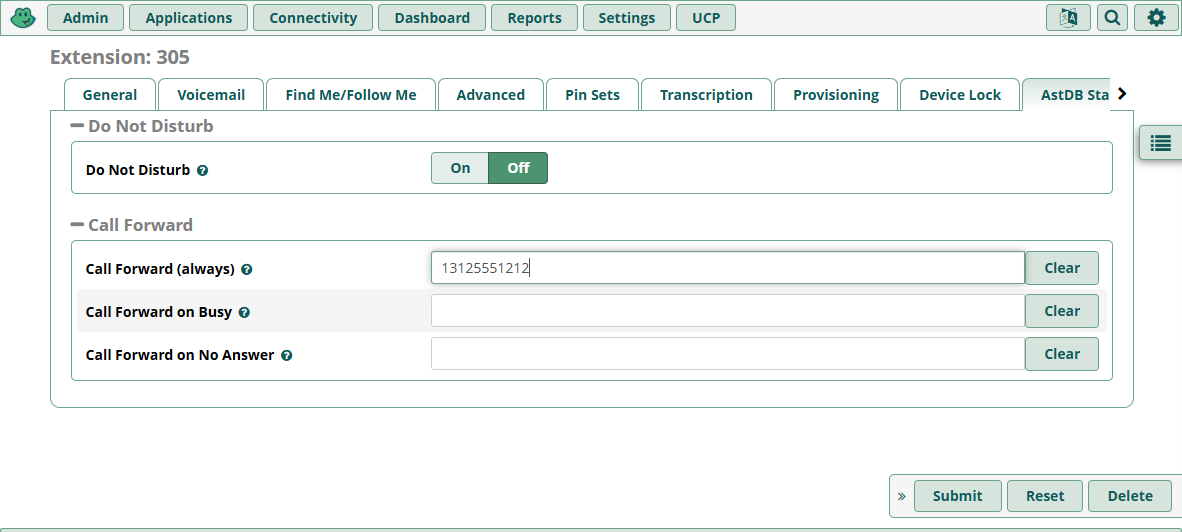
Click Clear → field empties (and refocuses so you can type a replacement). Click the form's Submit at the bottom → all four fields persist in one transaction.
The FreePBX framework already requires the manage_extensions ACL to reach the Extensions edit page at all, so the AstDB State tab inherits that gate automatically. No additional permission checks needed.
Per-extension reads go through AMI for live state (Asterisk has a 1–3 second lag flushing astdb writes to its sqlite file; the admin tab queries AMI directly via getStatusByExtension() and getStatusesByExtension()).
End users add the AstDB State widget to their UCP dashboard. One widget per assigned extension.
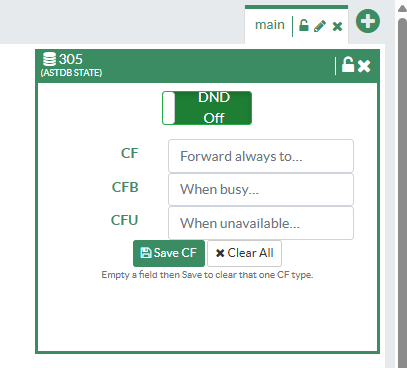
Every AJAX call validates the target extension is in the user's Settings/assigned list before any astdb write. Forging a request to a different extension returns "Permission denied — that extension is not assigned to you" and no astdb mutation happens.
Same pattern FreePBX's core UCP widgets use; verified against the reference implementations.
Why a combined widget when FreePBX ships separate DND and Call Forward UCP widgets? Because the value of this module is consolidation. Users see one widget per extension covering all four state flags, instead of having to add and arrange separate widgets and remember which is which. The core widgets remain functional and can be left enabled or hidden via UCP module-permissions — your choice.
Every state value lives where it always has — Asterisk's /var/lib/asterisk/astdb.sqlite3. Uninstalling the module leaves astdb untouched (we don't own that data, just visualize and edit it).
Status page reads all four families in a single direct PDO sqlite query, joined in PHP against the users table. Single round-trip even for 500+ extensions.
Extension tab and UCP both use AMI via the core helper methods. Always live, no flush-lag issues.
Through \FreePBX::Donotdisturb() / \FreePBX::Callforward() methods — never raw database_put. Guarantees BLF state propagates to every device assigned to the extension.
Astdb writes are live immediately. Asterisk reads astdb on every inbound call; there's no dialplan reload required for our changes to take effect.
The Apply Config bar that may appear after saving the per-extension admin tab is the framework's default behavior for any POST to the Extensions form (it can't tell what part of the form changed) — clicking Apply Config is not required for the astdb changes to be active. UCP widget saves bypass the form entirely and never trigger the bar.
Scope is deliberately narrow — we fill one specific gap in stock FreePBX, nothing more.
Follow-Me state lives in astdb/AMPUSER/<ext>/followme/* and is fully covered by the stock findmefollow module's UCP widget and admin page. We don't duplicate that.
vmnotify and the stock voicemail admin cover voicemail state.
That's core show hints territory — we report stored DND/CF state, not real-time line activity.
Single-PBX module; status is for the PBX it runs on. Fleet rollup is up to you — the REST API pattern would make a unified dashboard easy to build, but isn't bundled.
For external monitoring or scripted bulk operations. OAuth2-protected, same pattern as every other VoIP Stuff module.
| Endpoint | Purpose |
|---|---|
GET /api/customastdb/status?route= | Full table of all extensions + DND/CF/CFB/CFU |
GET /api/customastdb/extension/{ext}?route= | Per-extension state |
| Write endpoints | Reserved for v1.1 — currently writes only via UI/UCP |
The module depends on donotdisturb and callforward (both ship with stock FreePBX), so no extra downloads. No schema, no cron, no sudoers, no dialplan edits — it's a pure UI layer over existing core data.
After install, visit Admin → AstDB Status. Click any extension number to jump to its AstDB State tab. Set or clear DND/CF state. Done.
In FreePBX, go to Admin → Module Admin → Upload modules, upload the tarball, then Install and Apply Config.
The AstDB Status menu item appears under Admin. Open it, see every extension's state at a glance, click any extension number to manage it.
No. Every write routes through the core \FreePBX::Donotdisturb() and \FreePBX::Callforward() helpers, which fire the same per-device AST_FUNC_DEVICE_STATE updates that the feature codes (*78, *72, etc.) trigger. BLF lights stay accurate.
No. Astdb writes are live immediately — Asterisk reads astdb on every inbound call. The Apply Config bar that appears is the framework's default behavior for any POST to the Extensions form; it has no effect on the astdb writes. UCP widget saves bypass the form and never trigger the bar.
No. Every UCP AJAX call validates the target extension is in the user's Settings/assigned list before any astdb write happens. Forging a request to a different extension returns a permission-denied response and no mutation occurs.
donotdisturb UCP widget?No. The stock widget remains functional. You can leave it enabled, hide it via UCP module-permissions, or have both available at once. Our widget is a consolidation widget — same astdb keys, just one tile instead of separate widgets for DND and Call Forward.
fwconsole ma uninstall customastdb removes the menu item, the Extensions-page tab, and the UCP widget. astdb is untouched — every DND/CF value an admin set via this module continues working through stock feature codes after the module is gone.
Yes — MIT licensed. No license keys, no subscriptions, no phone-home. Built on FreePBX's BMO framework.
Stop SSH'ing to clear DND. Stop walking users through feature codes. Just open the Extensions page.