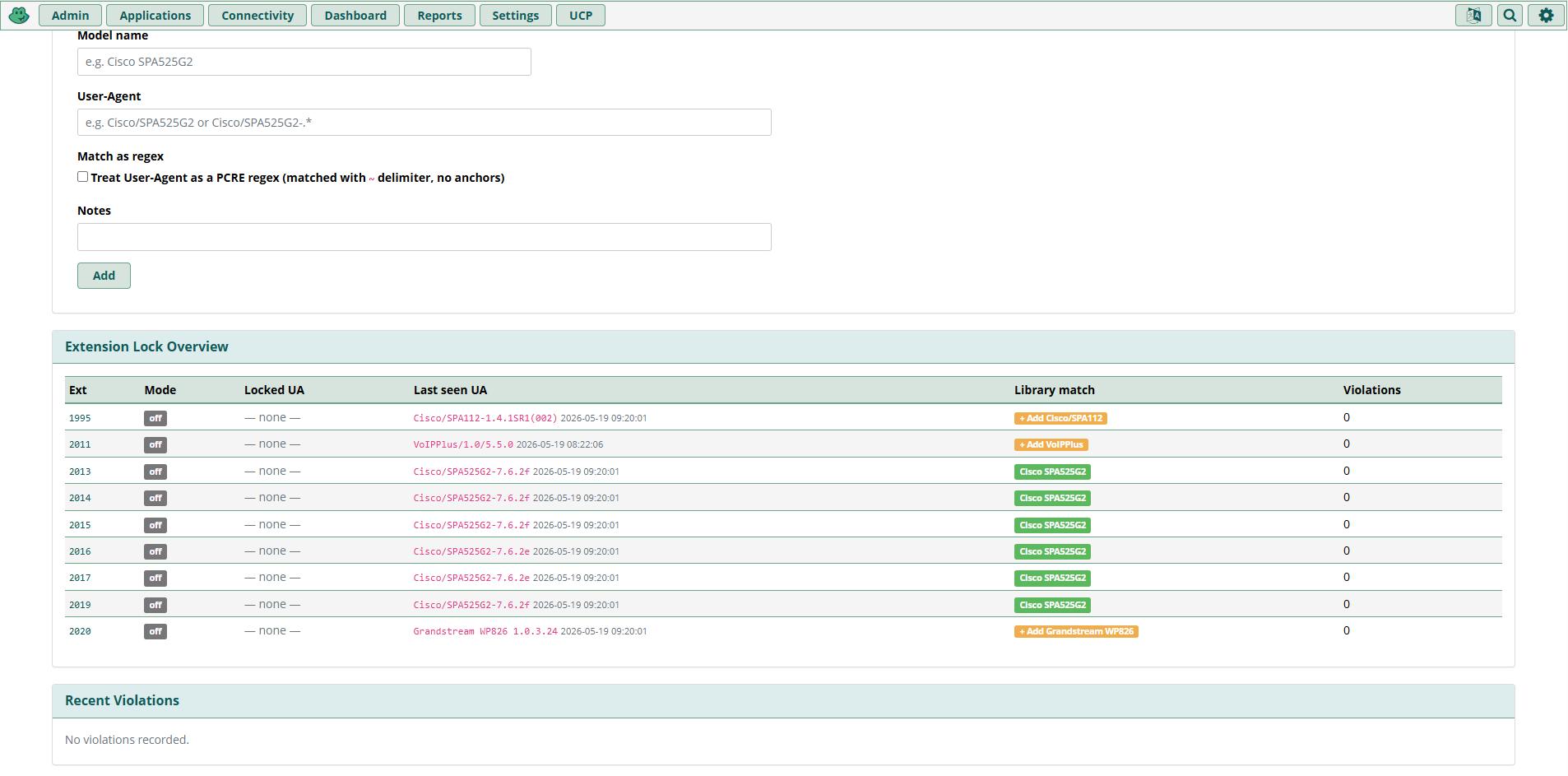
Device Lock Overview — every extension's lock target, last-seen User-Agent, and violation history at a glance
Pin every extension to its physical phone and stop credential-theft toll fraud. Bind each SIP extension to the User-Agent of the device it was provisioned on — stolen credentials become useless on any other phone, scanner, or softphone.
Standard PJSIP auth on a FreePBX system checks one thing: does the password match? Anyone with a leaked extension/secret pair — pulled from a backup, an old config file, a misconfigured provisioning portal, or a brute-forced REGISTER scan — can sign in from any IP, on any device, and start placing calls on your dime. By the time the CDR alert fires the damage is already done.
The standard advice (Fail2Ban, strong passwords, lock to source IP) works only for stationary endpoints. The moment you have a real-world mix of desk phones, mobile softphones, hot-desks, home-office workers on dynamic IPs, and remote agents on cellular, IP-based restrictions become impractical and password rotation becomes a support burden.
Every legitimate SIP phone identifies itself in the User-Agent header of every REGISTER it sends — Cisco/SPA525G2-7.6.2f, Yealink SIP-T46G 96.84.1.5, PolycomVVX-VVX_311, and so on. Pin the extension to that fingerprint and the credentials become useless on any other device. The attacker's Zoiper, Linphone, or custom scanner announces itself as something different and is shown the door.
Compatibility: Built and tested on FreePBX 16 and 17 with PJSIP. No chan_sip support (deprecated upstream).
Two cooperating enforcement paths — the REGISTER itself is allowed, but the moment the attacker tries to use it, the call is dropped.
A real desk phone, mobile softphone, or attacker with stolen credentials sends a SIP REGISTER to FreePBX/PJSIP. The request carries a User-Agent header that identifies the device — e.g. Cisco/SPA525G2-7.6.2f for a legitimate phone or Zoiper/2.10 for an attacker's softphone.
PJSIP emits a ContactStatus event for every successful registration. The Device Lock daemon, subscribed to AMI, reads the User-Agent off that event and compares it to the lock configured for the extension — either a per-extension lock or the system-wide fallback.
If the User-Agent matches, the daemon updates last_seen_ua and clears any prior violation — the extension is good to go. If it doesn't match, the daemon writes a violation record (extension number, offending UA, timestamp) and sets the VIOLATION flag in AstDB.
The REGISTER itself completes — if it didn't, the phone would hammer the PBX retrying every few seconds. The block happens later: as soon as the rogue device tries to place a call, the dialplan splice in macro-user-callerid checks the AstDB violation flag. If it's set, the call is dropped with a "no service" prompt before Dial() is ever reached, and the attempt is logged in the CDR for forensic review.
Subscribes to Asterisk's ContactStatus events and inspects the User-Agent of every successful REGISTER in real time. Mismatches are logged to the violation table and flagged in AstDB.
Spliced into macro-user-callerid so it fires on every outbound call from every extension. If the violation flag is set, the call is dropped with a "no service" tone before it reaches Dial().
The REGISTER itself is allowed to complete (otherwise the phone hammers your PBX retrying every few seconds). The block happens the instant the attacker tries to use the registration for anything.
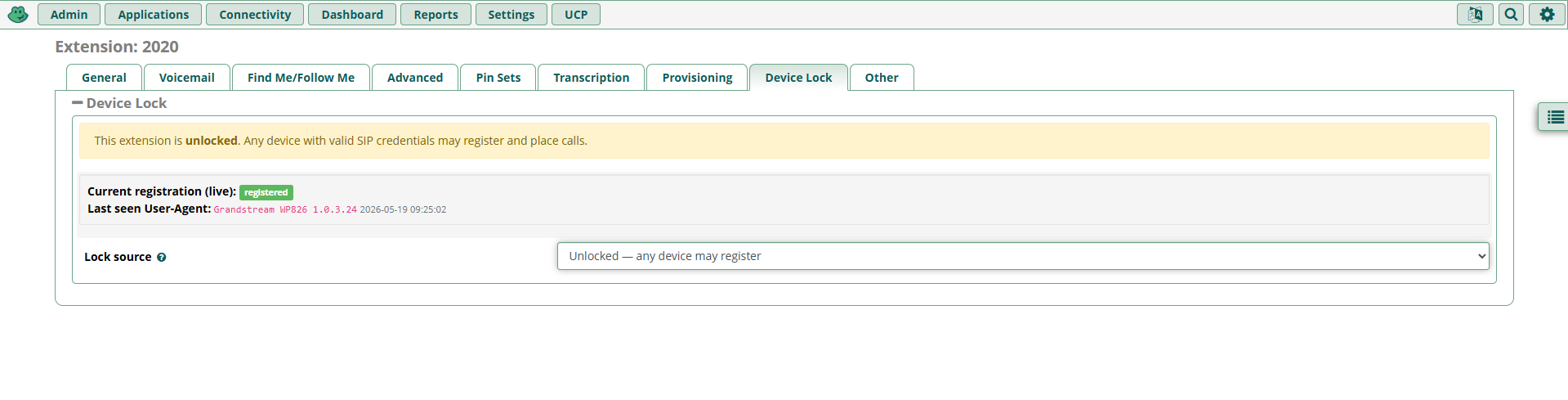
A "Device Lock" tab appears on every Extension edit page. Three ways to set the lock.
Captures the exact User-Agent the phone is currently registered with (down to the firmware version) and pins the extension to it. Use this when you want a specific physical handset, not "any Cisco SPA303 anywhere."
Pick a regex pattern from the shared Phone Library (e.g. Cisco/SPA303 matches any SPA303 regardless of firmware). Useful when you swap handsets between users but keep the model uniform.
Drop in your own exact string or PCRE regex for unusual devices, branded firmware builds, or staged rollouts.
Per-extension locking is granular but tedious to set up on day one. The system-wide fallback fixes that: turn it on, pick a default phone model (say, the Cisco SPA525G2 your office is standardized on), and every extension that doesn't have its own lock automatically inherits that fingerprint.
Roll the fingerprint out broadly, then carve exceptions for the handful of extensions that use something different. Disable it again and unlocked extensions go back to accepting anything. Re-enable and every PBX extension's enforcement state is recomputed against current registrations in one pass.
Ships with known fingerprints for Cisco SPA series, Yealink T-series, Polycom VVX, Grandstream GXP, Linphone, MicroSIP, Zoiper, 3CXPhone, and Asterisk PBX. Add new models as you encounter them — the "+ Add Model" button in the Overview table promotes any extension's currently-seen User-Agent directly into the library.
Deletion is guarded: an entry can't be removed while any extension is locked to its pattern, and the system-wide fallback won't let you delete its target while active. Tooltips explain exactly which extension or setting is blocking the delete.
The listener writes last_seen_ua and timestamp for every extension. Live status banners on the per-extension tab show the current registration state and, when applicable, flag an active violation in red with the offending UA.
A separate violation log captures who tried what, when: extension number, the offending User-Agent, the timestamp, and a running violation count. When enforcement is active, the dialplan plays a "no service" prompt and hangs up. The CDR records the attempt for forensic review.
Runs under the asterisk user, watchdogged by cron with flock so a crash auto-recovers within 60 seconds. Lock file and log live under /var/run/asterisk/ and /var/log/asterisk/.
Stores per-extension lock state and violation flag at CUSTOMLOCK/LOCK_MODE/<ext> and CUSTOMLOCK/VIOLATION/<ext>. The dialplan check reads these directly — no MySQL hit on the call path.
Uses FreePBX's doDialplanHook and reads the calling extension from ${CHANNEL} (not ${AMPUSER}, which is unset at the splice priority).
Three tables: customlock_phones (the library), customlock_extension (per-ext state, last-seen, violation history), and customlock_config (module settings).
Note on PJSIP identifiers: reordering the global PJSIP identifier chain (using match_header=User-Agent as a primary identifier) was considered and removed. Standard PJSIP identifies endpoints by an OR-chain, so a match_header block can't actually block a wrong-UA REGISTER unless you also drop the username identifier globally — which breaks every PBX endpoint that doesn't have a customlock identify block. The current AMI+dialplan design achieves the same effective result without touching the global PJSIP identifier chain.
Install as a standard FreePBX module. The AMI listener daemon and cron watchdog are installed automatically.
Go to Admin → Module Admin → Upload modules and upload the tarball. Or use the Download (From Web) option to pull it directly from the repo.
Find "Device Lock" in the module list, click Install, then Apply Config. The module self-signs on install and registers a voip-stuff.net repository address for future updates directly through FreePBX Module Admin.
After installation, navigate to the Device Lock admin page to manage the Phone Library, toggle the System-Wide Fallback, and review the Extension Lock Overview.
Uninstall removes the cron entry, the listener, the AstDB tree, the dialplan splice, and the database tables — no manual cleanup needed.
Two surfaces. Defaults are sane out of the box — no other settings to tune.
It depends on the lock mode. "Lock to THIS device only" captures the exact User-Agent including the firmware version, so a firmware update will trigger a violation until you re-capture. "Lock to a phone model" uses a regex like Cisco/SPA303 that matches any firmware version — the recommended mode if you keep firmware up to date.
Spoofing the User-Agent string requires the attacker to know exactly which device fingerprint is allowed for that extension. They can't get that from your PBX over the network — it lives in the FreePBX database. Combined with rate-limited REGISTER attempts, the attacker has to guess the fingerprint blind, which is dramatically harder than guessing a password. It's not absolute protection, but it removes the easy attack path.
No. Device Lock is PJSIP-only. chan_sip is deprecated upstream in Asterisk and FreePBX, and the module relies on PJSIP's ContactStatus AMI events.
No. The dialplan check reads the lock state from AstDB, not MySQL — AstDB lookups are sub-millisecond. The User-Agent comparison happens asynchronously in the AMI listener daemon, not on the call path.
Yes. Set the per-extension lock mode to "None" or clear the violation flag from the Device Lock tab. The system-wide fallback also has an off switch if you need to disable enforcement system-wide while troubleshooting.
Yes. Released under the MIT license — free for commercial and personal use. No license keys, no subscriptions, no phone-home.
Download the module and stop credential-theft toll fraud on your FreePBX system in minutes.