Available Now

FreePBX Custom Disk Module

Stop the "disk full" 3 a.m. calls. A free, open-source FreePBX 16/17 module that watches every category of bloat a real-world Asterisk box accumulates — module cache, systemd journal, package cache, logs, recordings, backups — and trims each against admin-set retention knobs every night. No DB pruning, no destructive surprises, intruder-tracking logs preserved by default.

Why This Exists

Run a fleet of FreePBX boxes for a few years and the same thing happens to every one of them: the root partition slowly fills up with files nobody knows are there, until one morning Asterisk can't write a CDR, voicemail recording fails mid-message, the backup module bombs out, and you're on a Sunday-morning call from a customer because dialtone went away.

None of this is touched by stock FreePBX. Sangoma's paid Sysadmin Pro module has a Storage page but it's a mountpoint UI for redirecting backups to network shares — it doesn't actually do per-category cleanup. Custom Disk is a free alternative that does. Realistic floor across a typical fleet: 3 GB freed per PBX, ~100 GB fleet-wide. None of it from the recordings or DB you actually care about.

The Usual Culprits

Verified across a 330-PBX fleet audit before this module was written:

  • /var/cache/apt/archives — 1.2 GB of stale package downloads
  • /var/log/journal — 1.4 GB (unbounded by default)
  • admin/modules/_cache — 500–700 MB of every .tgz.gpg ever downloaded
  • core-fastagi_out.log-* — 1.5 GB from a deleted-but-open-fd writer
  • freepbx.log-* — ~100 MB/day on noisy PBXes
  • Call recordings, 1–5 GB/month with no built-in age-out
  • FreePBX module backups, kept forever unless manually pruned

Compatibility: FreePBX 16 and 17 on Debian (apt) or RHEL/Alma/Rocky (dnf). Auto-detects which package manager you have and uses the right cleaner.

How It Works

Three cooperating layers, all running as the asterisk user under flock so a missed run auto-recovers within 60 seconds and overlap is impossible.

02:30 nightly — logrotate-gap

Rotates /var/log/asterisk/full, messages, and fail2ban-* logs — the files FreePBX's own /etc/logrotate.d/ snippets don't cover (Asterisk's logger module rotates them without a size cap). Compresses anything older than 7 days; never deletes within the intruder-tracking floor.

03:00 nightly — the janitor

Walks all 10 cleanup categories, trims each against the configured retention knobs, and emails the admin if disk usage is still over the action threshold when the run finishes.

Every 15 minutes — hourly health

Reads root partition usage. If usage is at or above the emergency threshold (default 90%), spawns an out-of-band cleanup pass and sends an urgent email. Rate-limited to one extra pass per hour so it can't loop.

Writes are guarded by hard-coded safety rails the admin can't override: never delete from /etc/, never touch *.sqlite3/*.db/*.ibd files, never touch files owned by mysql, never touch /var/lib/asterisk/sounds/moh/keys, and a 30-day minimum on every intruder-tracking log file regardless of admin setting. If anything tries to delete during a FreePBX backup window (/var/lib/asterisk/backup.lock present), the whole run aborts.

The 10 Cleanup Categories

Every category has its own retention knob. Defaults are sized to the partition; everything is editable.

CategoryWhat it doesRestart needed?
Module cachePer-module: keep only the currently-installed version (configurable: keep N most-recent others too, 0 = wipe cache entirely)No
systemd journaljournalctl --vacuum-size=<cap> — capped without editing journald.conf (vacuum runs nightly to keep size bounded)No
Package cacheapt-get clean (Debian) or dnf clean all (RHEL) — only when current size > configured cap, and only when the UI toggle is enabledNo
FastAGI logsTruncate-in-place any "hung-fd" core-fastagi_out.log-* (the deleted-but-open-fd pattern that grows to 1.5 GB), plus age-out dated rotated filespm2 --reload-logs when a truncate happens
Asterisk logsDelete rotated *.log-* files older than the knob, with asterisk -rx 'logger reload' if full*/messages* were touchedlogger reload when needed
freepbx.log overflowTail-truncate each freepbx.log-* to the per-file cap (keeps the most recent content)No
fail2ban logsDelete rotated fail2ban-* files older than the knob — 30-day intruder-tracking floor enforced server-sideNo
queue_logDelete rotated queue_log-* older than the knobNo
Call recordingsDiscover MIXMON_DIR from Asterisk globals, delete recordings older than the knob, prune empty year/month/day dirs. Offsite-policy aware.No
FreePBX backupsPer backup-job directory, keep the N most-recent .tar.gz, prune the restNo

Auto-Detected Install Defaults

At install time the module reads disk_total_space('/') and seeds reasonable defaults proportional to the partition size. Defaults work on a 14 GB virtual PBX or a 500 GB hardware box without retuning.

KnobDefault formula
Journal cap (MB)min(2% of partition, 300 MB) floored at 100 MB
Module cache versions to keep1 (installed version only)
Package cache cap (MB)min(1% of partition, 100 MB)
freepbx.log overflow cap per file (MB)min(0.5% of partition, 20 MB)
Recording max age (days)90
Asterisk log max age (days)30
FastAGI log max age (days)30
fail2ban log max age (days)30 (also the hard floor)
queue_log max age (days)60
FreePBX backups to keep3
Intruder-log preserve floor (months)1 = 30 days (editable; 0 = never delete)
Action threshold (% used)80
Emergency threshold (% used)90

Every value is editable from the admin UI; defaults are not overwritten on subsequent upgrades.

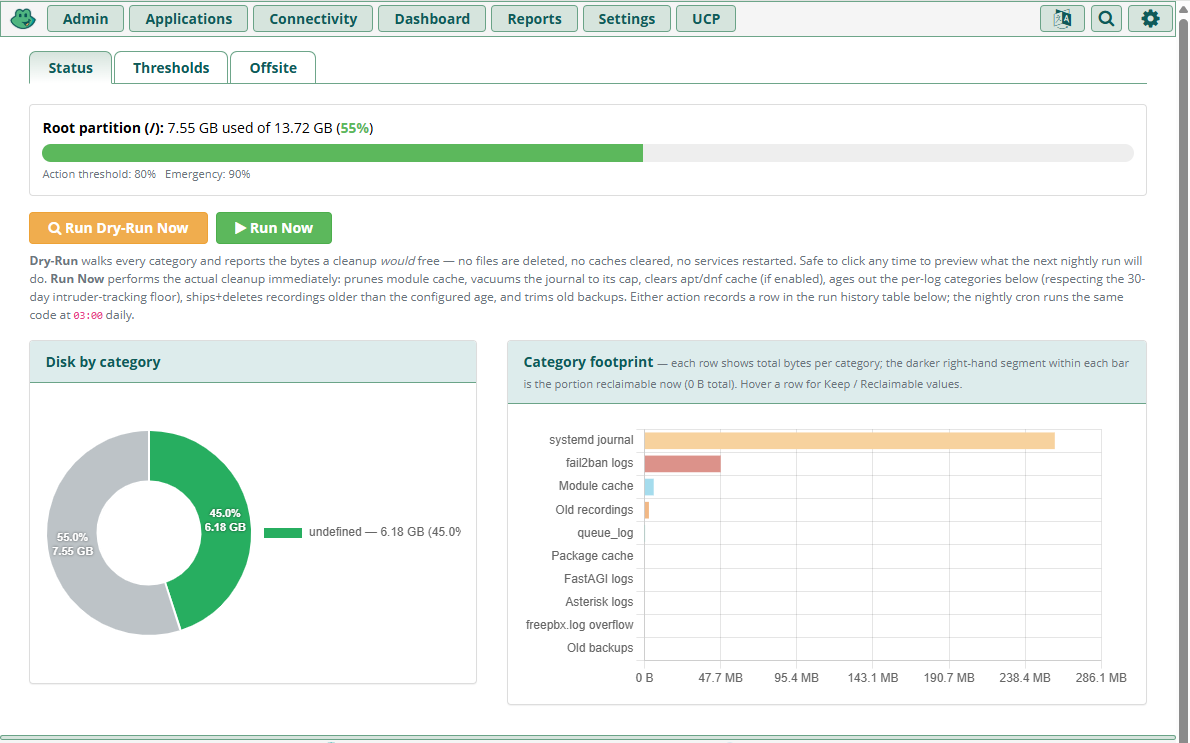
Status Page — See Where Your Disk Went

A three-tab admin UI: Status (the visualization), Thresholds (the retention knobs), and Offsite (transport & per-category archive policy).

Status tab showing doughnut chart of disk usage by category with on-slice percentages and stacked bar chart of category footprint with reclaimable slice highlighted
Status tab — doughnut chart of disk usage by category with on-slice percentages, plus stacked bar chart of category footprint with the "reclaimable now" slice highlighted

Each wedge ≥ 4% gets its own label; the legend shows values for every category including sub-4%. Run Dry-Run Now and Run Now buttons spawn the janitor on demand and stream the result back into the page.

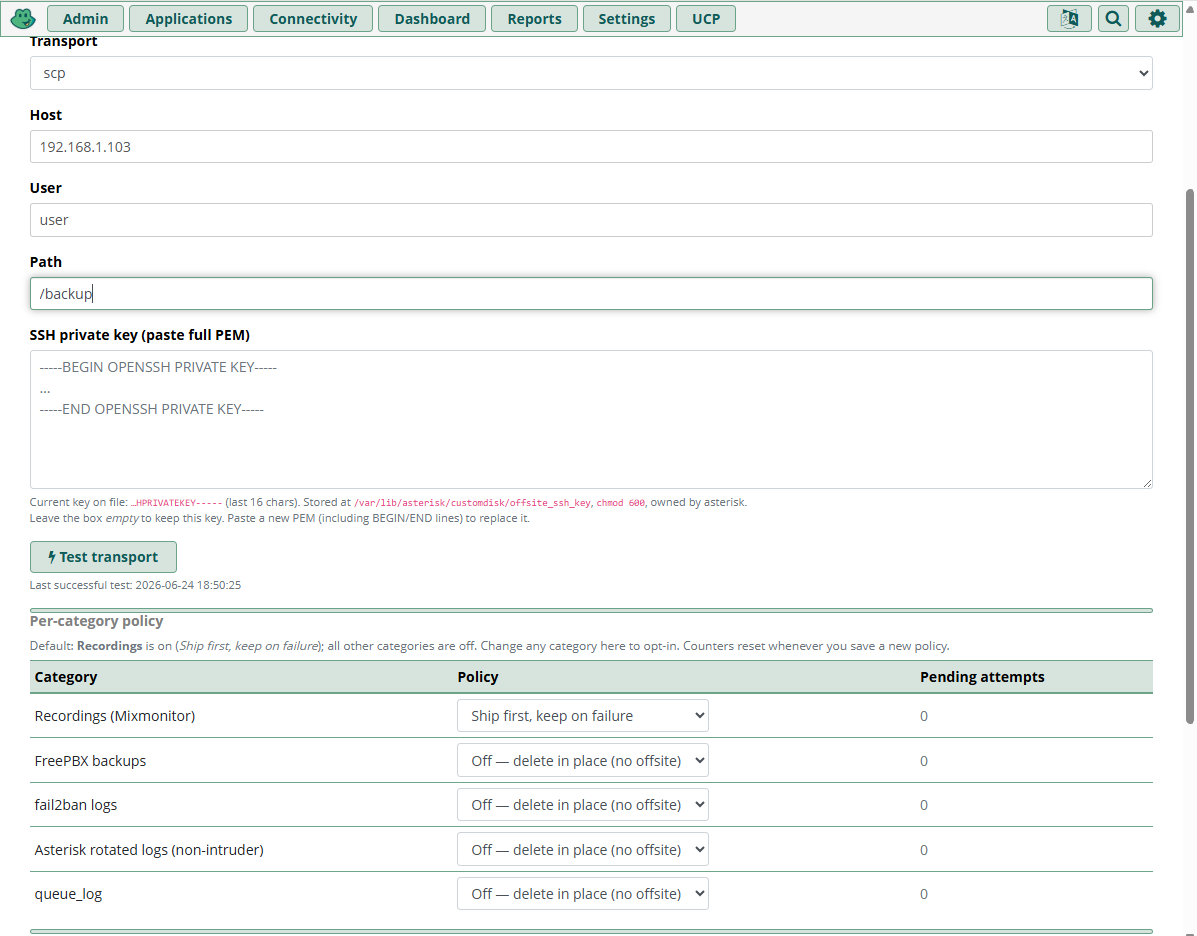
Per-Category Offsite Policy

Ship to remote storage before local deletion. Five categories can opt in: Recordings, FreePBX backups, fail2ban logs, Asterisk rotated logs, queue_log.

Offsite tab showing transport config and per-category policy dropdowns with retry and escalation settings
Offsite tab — transport config, per-category policy dropdowns, retry count, and escalation behavior all in one place

Per-Category Modes

Off

Delete in place per the age knob (no offsite). Default for all except recordings.

Ship first, keep on failure

Bundle into a zstd tarball, ship via the configured transport, only delete locally on successful upload. If shipping fails, keep the files and retry. Default for recordings.

Ship if available, delete anyway

Try once, delete regardless of outcome. Best-effort archive for low-value-but-nice-to-have data.

Transport Options

Supported Transports

  • rsync over SSH
  • scp
  • AWS S3 (with Glacier IR storage class)
  • Backblaze B2

Configured once in the Offsite tab; the same transport is reused by every category that opts in. SSH key is pasted as PEM into a textarea; the module saves it to /var/lib/asterisk/customdisk/offsite_ssh_key at chmod 600 and normalizes CRLF→LF (a common browser-textarea pitfall that breaks OpenSSH).

Failure Escalation

After max_retry consecutive failed ship attempts (default 3), choose:

  • Keep + email (default, safer for data) — category pauses, urgent admin email
  • Force-delete + email (safer for disk) — files removed even though offsite failed

Both emails are rate-limited (1 h emergency, 24 h action-threshold) so a sustained condition doesn't flood your inbox.

A Test transport button ships a 1-byte file end-to-end so you can validate before going live.

Thresholds & Notifications

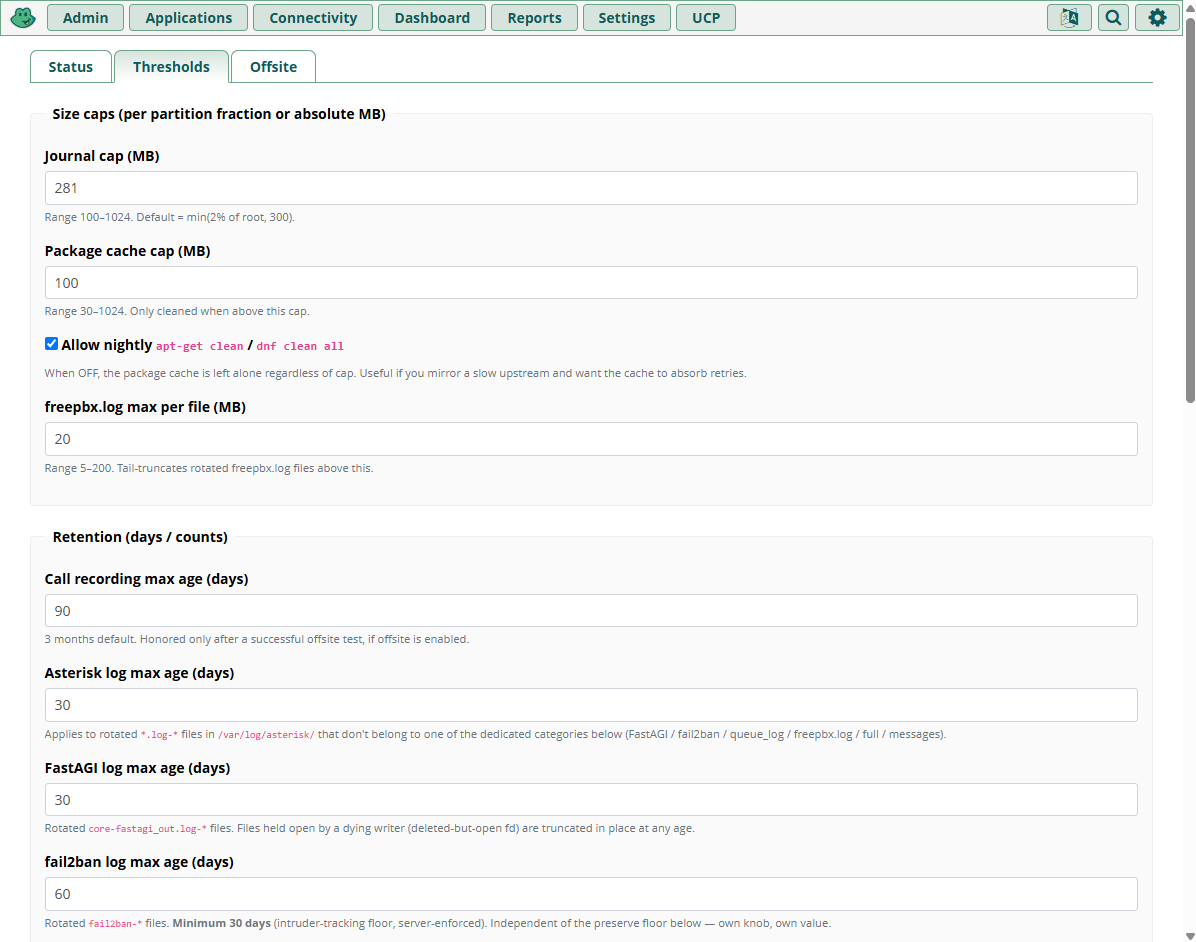
Every retention knob in one form. Safe ranges enforced server-side (no setting fail2ban below 30 days, etc.).

Thresholds tab showing all retention knobs in one form with inline help text and safe-range enforcement
Thresholds tab — every retention knob in one form, with inline help explaining what each one does and why it's bounded the way it is

Action threshold (default 80%)

After the nightly janitor finishes, if disk is still at or above this percent, email goes out (rate-limit: 1 per 24 h). Same notification fires from the hourly health check if usage crossed the line between nightly runs.

Emergency threshold (default 90%)

The hourly check spawns an out-of-band cleanup pass (rate-limit: 1 per 4 h to prevent runaway loops), sends an urgent email (rate-limit: 1 per hour, separate anchor so emergency never gets swallowed by the 24 h limit).

Notification email auto-populated from FreePBX's Module Admin → Notification email setting if not overridden locally; subject line uses the System Identifier (FREEPBX_SYSTEM_IDENT).

What Custom Disk Does NOT Touch

Hard exclusions baked into every category function. The module manages data; it doesn't own it.

/etc/ — never

System configuration is off-limits, full stop.

Database files — never

*.sqlite3, *.db, *.ibd files are excluded. Any file owned by mysql is excluded.

Asterisk runtime data — never

/var/lib/asterisk/sounds, /moh, and /keys are never touched.

CDR — out of scope

CDR retention is a separate concern. See the Custom CDR module for read-only reporting; CDR retention is handled by cdrpro or Custom CDR v1.1.

Voicemail — off by default

Voicemail only age-outs if the admin explicitly enables it with a non-zero voicemail.max_age_days.

Active backups — never compete

If /var/lib/asterisk/backup.lock is present, the entire janitor run aborts cleanly.

REST API for Fleet Monitoring

OAuth2-protected endpoints under /api/customdisk/ — built for Zabbix, Nagios, PRTG, and your own dashboards.

EndpointPurpose
GET /statusCurrent disk usage + per-category reclaimable + last-run summary + config snapshot
POST /runSpawn a manual cleanup run, returns {run_id}
POST /dry-runSame but read-only estimate
GET /run/{id}Poll for completion + per-category JSON breakdown

Under the Hood

Permissions Model

Cron worker runs as asterisk. Privileged operations get narrow sudoers entries written at install time:

asterisk ALL=(root) NOPASSWD: /usr/bin/journalctl --vacuum-size=*
asterisk ALL=(root) NOPASSWD: /usr/bin/systemctl restart systemd-journald
asterisk ALL=(root) NOPASSWD: /usr/bin/apt-get clean
asterisk ALL=(root) NOPASSWD: /usr/bin/dnf clean all

Four lines, every command pinned exactly. visudo -c validates before atomic rename — a typo can't lock you out of sudo.

Storage & Schema

Two MySQL tables: customdisk_config (KV settings) and customdisk_runs (history of every cleanup pass with per-category JSON breakdown). Zero schema dependencies on Asterisk's data.

Cron + flock watchdog: missed runs auto-recover within 60 seconds; flock -n prevents overlap; never pgrep -f (which races on the shell process itself).

Install

Standard FreePBX module. First install (running as root) writes the sudoers file and creates lock/log files; subsequent web-UI installs reuse them.

Command Line

fwconsole ma refreshsignatures
fwconsole ma downloadinstall customdisk
fwconsole reload

Cron entries auto-register as the asterisk user. No reload of Asterisk is needed for the module itself to start working — the nightly cron picks it up on the next 03:00.

From Module Admin

Download the module

Get the tarball:

Upload and install

In FreePBX, go to Admin → Module Admin → Upload modules, upload the tarball, then click Install and Apply Config.

Try it without waiting for cron

Open Admin → Custom Disk → Status → Run Dry-Run Now. The dry-run reports bytes-that-would-be-freed per category without writing anything. Sanity-check the numbers, then click Run Now if they look right.

Frequently Asked Questions

Will it delete my call recordings?

Only if you let it. The default is to delete recordings older than 90 days only after they're successfully shipped offsite. If no offsite transport is configured and the recordings age policy is "ship first, keep on failure" (the default), nothing gets deleted locally until the upload succeeds. Set the recording max-age knob to 0 and the category never runs.

Does it touch the CDR database?

No. CDR pruning is a completely separate concern and out of scope. The module never touches any MySQL file, anything owned by mysql, or any *.sqlite3/*.db/*.ibd file. See the Custom CDR module for CDR reporting; CDR retention itself is handled by cdrpro or Custom CDR v1.1.

What if I'm in the middle of a backup when the janitor runs?

The janitor checks for /var/lib/asterisk/backup.lock before doing anything. If a backup is in progress, the entire run aborts cleanly — it never competes with a backup write.

Can I run it manually before trusting cron?

Yes — that's the recommended first step. The Status tab has Run Dry-Run Now which reports bytes-that-would-be-freed per category without writing anything. Sanity-check the numbers, then click Run Now if they look right.

What happens to my fail2ban / intruder logs?

Hard floor of 30 days, server-side, regardless of what you set in the UI. The module will never delete asterisk/full*, auth.log*, secure*, syslog*, or fail2ban-* within that window. You can set the floor to 0 (never delete) if you want to keep intruder logs forever.

Is the module free?

Yes — MIT licensed. No license keys, no subscriptions, no phone-home. Built on FreePBX's BMO framework.
Uninstall

fwconsole ma uninstall customdisk drops the two MySQL tables, removes the cron entries, removes the sudoers file. Asterisk logs, recordings, and astdb are untouched — the module manages data; it doesn't own it.

Stop Worrying About Disk Space

Free up roughly 3 GB per PBX on the first run, then keep the partition healthy automatically. No 3 a.m. calls.